In the previous episode, I showed how to deploy Azure Data Factory in a way recommended by Microsoft, which is deployment from adf_publish branch from ARM template.
However, there is another way to build CD process for ADF, directly from JSON files which represent all Data Factory objects.
In this video, I will show you the latter method, building the entire process step-by-step, including the fact that we have multiple environments and wherefore isolated services. Therefore, we need to manage all the needed properties, correctly.

**IMPORTANT NOTICE:**Update @ 02/06/2020:
Since now, I recommend this extension to Azure DevOps only, if you plan to deploy ADF from code.
Extension: Deploy Azure Data Factory by SQLPlayer
It is free from objects dependencies issue and does all the work in one task. Check it out.
Update @ 02/05/2020:
Alternatively, you can use Azure PowerShell task in Azure DevOps and use a brand new PowerShell open-source module to publish the whole Azure Data Factory code from your [master] branch or directly from your local machine. The module resolves all pains existed so far in any other solution, including deployment part of objects, deleting objects not existing in the source any longer, stop/start triggers, etc.
More details and full documentation with code is in GitHub: https://github.com/SQLPlayer/azure.datafactory.tools
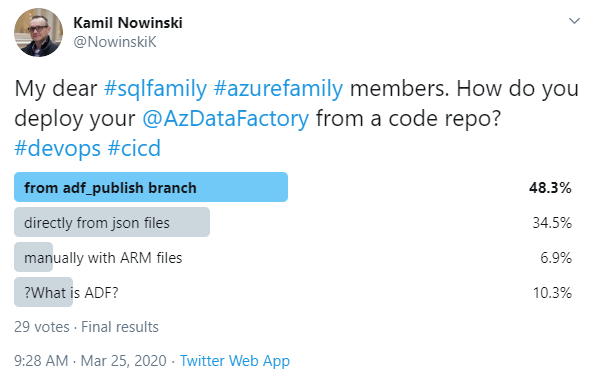
People are still divided on how to deploy ADF:
Links
The series about ADF on SQLPlayer blog.
Extension to Azure DevOps I used in this episode.